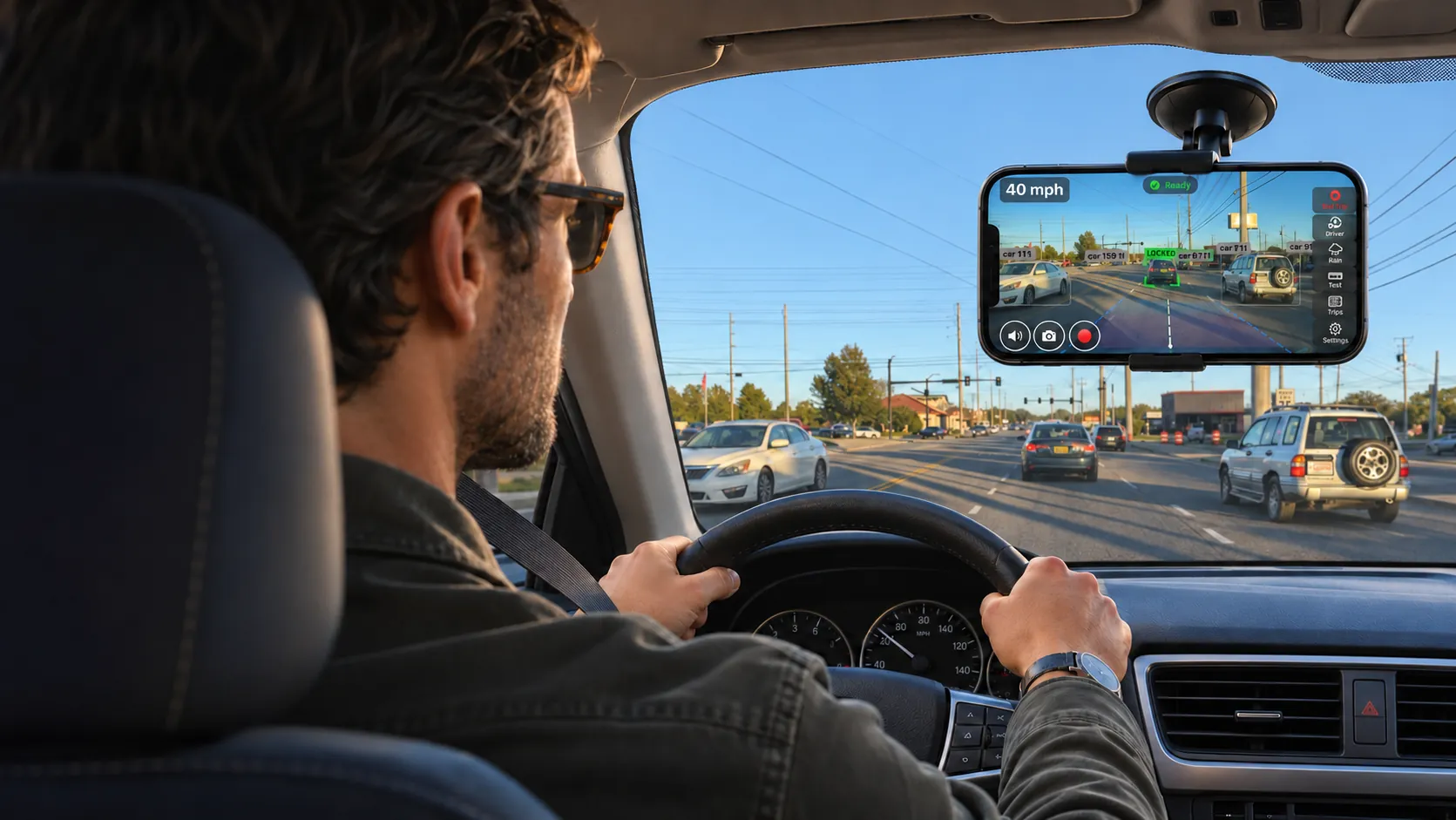
A second pair of eyes on the road, in the iPhone you already have
Everyone follows too close, glances away or misses a light sometimes. Cars with full driver assist speak up when it happens; many cars can’t, new ones included. Roadlert gives yours a voice: it warns you before a gap gets tight, when your eyes leave the road, when you drift or aren’t slowing for a red light, and it logs every trip’s miles for you.
A driver aid, not a safety system. It never controls the car.
- No extra hardwareJust your iPhone and a mount
- On-device AIVideo never leaves your phone
- Voice and screenHear it, or see it at a glance
- Works with Apple MapsDirections keep playing
The moments that go wrong, and what Roadlert does about them
Many cars, new ones included, are missing some of these warnings, and few watch the driver at all. These are the everyday moments those systems exist for, and how Roadlert covers them with the iPhone you already own. Not sure what your car has? Here’s how to add the driver-assist features it’s missing.
The car ahead stops and you’re suddenly braking hard
Roadlert counts the gap for you, in seconds, and says “Keep your distance” while there’s still time to ease off.
Following distance →A glance at your phone turns into three seconds, or your eyes start to close
Roadlert notices when your eyes leave the road or close, and says so out loud, so a lapse stays a moment.
Eyes on the road →You miss a stop sign or a light that just turned red
Roadlert gives a heads-up as you approach, and warns out loud if you aren’t slowing down enough to stop.
Red lights & stop signs →Honked at because you didn’t see the traffic move
Roadlert chimes when the car ahead pulls away or your light turns green, so you can look up and check it’s clear.
Traffic is moving →Drifting out of your lane on a long, straight road
Roadlert buzzes the moment a wheel reaches the lane line, so you correct early instead of on the rumble strip.
Lane drift →Someone steps out while you’re creeping through a parking lot
Roadlert watches the path you’re about to drive into and says what’s in it: a person, an animal or an object.
People & objects ahead →Work miles you drove but never claimed
Every drive with Roadlert is logged by itself, with its miles, times and places: mark it business and export the month for your expenses.
Trip & mileage log →Not knowing whether you’re actually a good driver
Every trip gets a score that sees the road, one tip to improve, and a weekly trend to show it’s working.
Trip score & coaching →No video when someone cuts you off or hits your car
Roadlert saves a clip of a close call or impact automatically, starting 10 seconds before it happened.
Event clips →Warnings you can hear, and see at a glance
Every warning comes three ways: a few spoken words, beeps that get more urgent with the danger, and a screen colour you can catch from the corner of your eye. Roadlert says it when it starts and once more, then stays quiet until something changes. No running commentary, no nagging.
Use whichever you prefer. The voice is the safer choice, because you hear it without taking your eyes off the road. Rather drive in quiet? One tap turns the voice off, and the beeps and the red screen stay.
Music and directions are turned down while it speaks, through the phone, Bluetooth or the car’s speakers.
- “Keep your distance”
- “Too close”
- “Stopped traffic ahead”
- “Stop sign ahead”
- “Red light”
- “Drifting left”
- “Eyes on the road”
- “Traffic is moving”
- “Green light”
Set it up once, then just drive
- 1
Mount your iPhone
Sideways, high on the windshield or on the dash, rear camera facing the road. A placement check with a live spirit level tells you if anything needs moving. Where to mount it
- 2
Drive. It switches itself on
Alerts start once you pull away with the phone mounted (“Roadlert is on”) and stay quiet until then. Nothing to measure: it learns the horizon, your phone’s height and your lane from the first minutes of traffic.
- 3
Review your trip
Trips log themselves, with the miles, times and places for your mileage log. Each gets a score out of 100 and one tip, and keeps clips of any close calls. How scoring works
A mileage log that fills itself in
Every trip Roadlert records is a mileage-log entry: date, start and end times, where you started and ended, and the miles driven by GPS. Mark it business or personal with a swipe, add the client in a note, and export the month as a spreadsheet for your expenses or your accountant.
See the mileage logIn every trip
- Date, start and end time, duration
- From and to, named from GPS
- Miles driven, measured by GPS
- Business or personal, plus your notes
- Monthly and yearly totals, CSV export
- Times and miles can’t be edited
Keep using Apple Maps or Google Maps
Start a route in your maps app, then open Roadlert. Spoken directions keep playing in the background, Apple Maps’ next turn stays visible at the top of the screen, and Roadlert briefly turns the directions down when it needs your attention.
How to set it upPrivate by design
- Road video and face analysis are processed on your iPhone
- No account, no ads, no analytics, no tracking
- Event clips have no audio and stay on your phone
- Works without an internet connection
How Roadlert compares
Factory driver assistance is better at some things. Radar sees further in the dark, and only the car can brake. Roadlert brings the alerts to cars that don’t have them, and adds coaching most cars don’t offer.
| Feature | Roadlert | Factory driver assist | ADAS dash cam | Navigation app |
|---|---|---|---|---|
| Following-distance alerts | Yes | Most new cars | Some models | No |
| “Traffic is moving” prompt | Yes | Some new cars | Some models | No |
| Lane-departure warning | Yes | Most new cars | Some models | No |
| Red-light and stop-sign alerts | Yes | A few premium cars | Rare | No |
| Eyes-on-road alerts | Yes | Some newer cars | Rare | No |
| Trip score that sees the road | Yes | Rare | No | No |
| Mileage log with CSV export | Yes | Some connected-car apps | Rare | No |
| Extra hardware | None (a phone mount) | A new car | Device + install | None |
| Can brake or steer | No | Often | No | No |
What Roadlert can’t do
- It warns. It cannot brake, steer or control the car in any way, and you are always responsible for driving.
- It can miss things. Darkness, heavy rain, low sun, a dirty windshield and unusual roads all reduce accuracy.
- It recognises everyday road users and objects, not debris, poles, cones or walls.
- Traffic-light and stop-sign alerts are tuned for the US for now.
- Running two cameras and AI uses power. Plug your iPhone in on long drives.
Questions drivers ask
Is Roadlert a self-driving or autopilot app?
No. Roadlert never controls the car. It watches the road and the driver through your iPhone’s cameras and gives spoken alerts. It is a driver aid, not a safety system: it can miss things, and you are always responsible for driving.
Can I add collision and lane-departure warnings to a car that doesn’t have them?
Yes, without wiring anything, whether the car is older or a new model without the driver-assist package. Roadlert gives it the warnings it is missing: following too close, closing fast, lane drift, red lights and stop signs, and eyes off the road, from an iPhone on a windshield mount. Even cars with driver assist seldom warn about red lights, and many don’t watch the driver. What no add-on can add is automatic braking: Roadlert warns, and you brake.
Do I need any extra hardware?
Only a windshield or dash mount that holds your iPhone sideways, and a charging cable for longer drives. There is no box to install and nothing to connect to the car.
Does Roadlert work with Apple Maps or Google Maps?
Yes. Start navigation in your maps app, then switch to Roadlert. The maps app keeps speaking directions in the background, and Apple Maps’ next-turn banner stays visible at the top of Roadlert’s screen. Roadlert briefly turns the directions down while it gives an alert.
Which iPhones does it work on?
iPhones with iOS 17 or later. Eyes-on-road and drowsiness alerts need an iPhone that can use the front and rear cameras at the same time: iPhone XS, XR or newer.
Is my video uploaded anywhere?
No. Road video and face analysis are processed on your iPhone and never sent to us or anyone else. Roadlert has no account and no analytics. The only thing that leaves the phone is an optional lookup with Apple Maps to name where a trip started and ended.
Can I use Roadlert as a mileage log for work?
Yes. Every trip records its date, start and end times, start and end places and GPS distance, and you can mark it Business or Personal and add a note such as the client. The Mileage screen totals each month and year, and exports a CSV spreadsheet (all trips or business only) for your expenses system or accountant. Times and distance can’t be edited. Trips are recorded while Roadlert is open on screen.
Do I need to look at the screen?
No, and you shouldn’t while driving. With the voice on, every warning is spoken in a few words (“Too close”, “Stop sign ahead”, “Traffic is moving”), so the screen is only for a glance. That’s the safest way to use it. If you prefer it quiet, turn the voice off: warnings still beep and turn the screen red. Set everything up before you drive off.
Give your car the alerts it’s missing
Roadlert is coming soon to iPhone. No extra hardware, no account, and everything runs on your phone.